AnyDesk vs TeamViewer: Prices, Free Use and Security Compared
In this guide
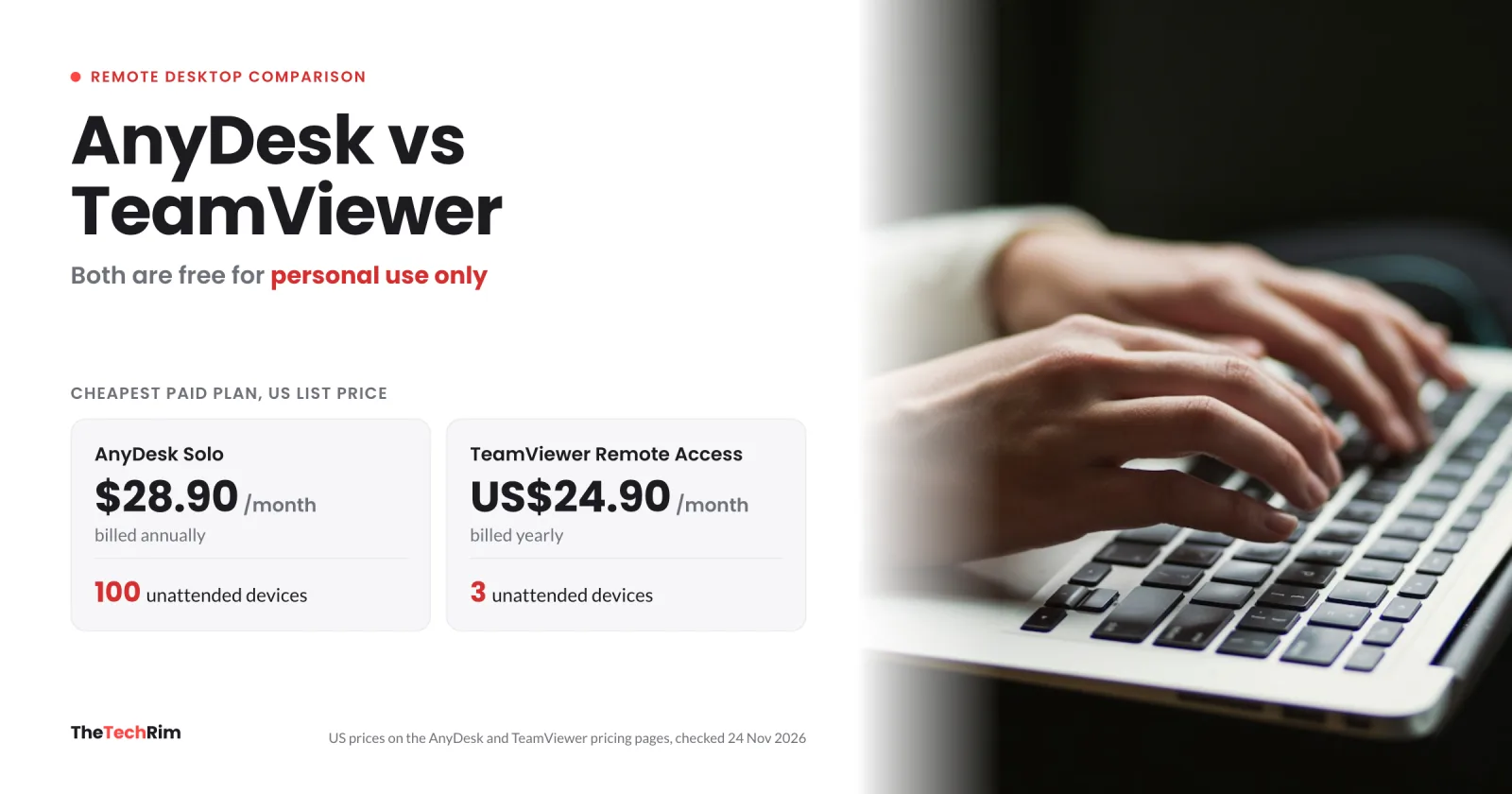
Pick AnyDesk if you support other people's computers on a small budget: its cheapest paid plan, Solo, covers 100 unattended devices and includes Android and iOS. Pick TeamViewer if your IT team wants AI troubleshooting credits and add-ons such as device monitoring and endpoint protection (none of which appear on AnyDesk's pricing page), or if you only reach up to 3 of your own devices. Remote Access has the lower list price, though AnyDesk's 20% one-year discount put Solo below it on the day we checked. Both are free for personal use only, and both bill once a year.
AnyDesk vs TeamViewer at a glance
| Feature | AnyDesk | TeamViewer |
|---|---|---|
| Free version | Personal, non-professional use only | Personal use only |
| Cheapest paid plan (US price) | Solo: $28.90 a month, billed annually | Remote Access: US$24.90 a month, billed yearly |
| Unattended devices on that plan | 100 | 3 |
| Team plan | Standard: $49.90 a month for 1 connection, up to 20 users | Premium: US$120.90 a month for 1 channel, 15 licensed users, 300 devices |
| Phones and tablets | Android and iOS in every plan | Add-on from Business up |
| Who needs a license | Only the person who starts the session | Only the expert giving support |
| Encryption | TLS 1.3, RSA 2048 key exchange, 256-bit AES | RSA 4096 key exchange, 256-bit AES |
| Two-factor authentication | Yes, including the free version | Yes, for all TeamViewer users |
| Single sign-on | Ultimate plan | Tensor plan |
| Platforms | Windows, macOS, Linux, FreeBSD, Raspberry Pi, ChromeOS, Android, iOS, Apple TV | Windows, macOS, Linux, ChromeOS, Raspberry Pi, Android, iOS, web app |
Price and plans
Neither company offers monthly billing. Both quote a monthly figure, bill yearly and exclude tax. AnyDesk also sells 2- and 3-year terms.
These are US prices on the AnyDesk pricing page, checked 24 November 2026, each per month and billed annually:
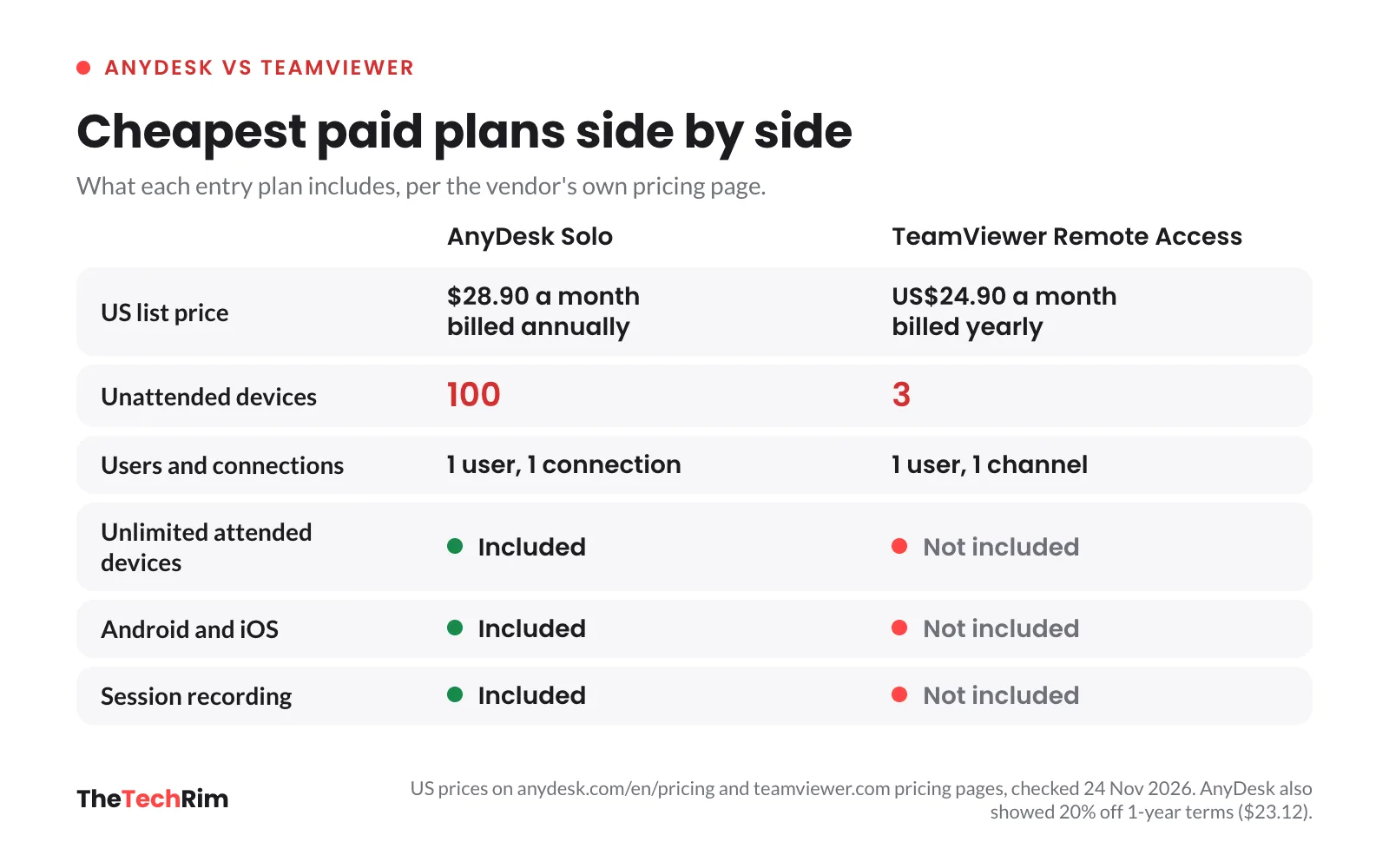
- Solo: $28.90. One user, 1 connection at a time, 100 managed devices for unattended access.
- Standard: $49.90 for 1 connection. Up to 20 users and 500 managed devices. Extra connections cost $44.90 each, up to 20.
- Advanced: $111.90 for 2 connections. Up to 100 users, 1,000 managed devices, MSI mass deployment and phone support.
- Ultimate: quote only. Single sign-on, from 2,000 managed devices, cloud or on-premises hosting.
On the day we checked, AnyDesk showed 20% off one-year terms, which brings Solo to $23.12 and Standard to $39.92. Two- and three-year terms showed 30% off.
These are US prices on the TeamViewer pricing page, checked 24 November 2026, each per month and billed yearly:
- Remote Access: US$24.90. One licensed user, 1 channel, 3 managed devices.
- Business: US$50.90. One licensed user, 200 managed devices, 25 AI credits a month.
- Premium: US$120.90. 15 licensed users, 1 channel, 300 managed devices.
- Corporate: US$245.90. 30 licensed users, 3 channels, 500 managed devices.
- Tensor: custom quote, with single sign-on.
TeamViewer's Black Friday offer takes 30% off the first year of new Business, Premium and Corporate purchases made in its webshop until 4 December 2026, 11:59 pm CET. Business drops to US$35.63 for that first year. Renewals are excluded, and the subscription renews every 12 months unless you cancel at least 28 days before the term ends.
Check the connection count before the user count. TeamViewer defines a channel as the number of users who can start remote connections at the same time, so Premium licenses 15 people but lets only one of them connect at a time, in up to 10 sessions in tabs. AnyDesk Standard also starts with 1 connection for up to 20 users.
Free for personal use: the rules
Both free versions are for private use only, and both companies watch for work use.
AnyDesk counts remote work and remote support as commercial, including connecting from home to your office workstation. The free version includes 3 managed devices, mobile device support, file transfer, one address book, two-factor authentication, chat and a whiteboard. AnyDesk says a free user account extends your connection time and avoids timeouts. If you are flagged by mistake, AnyDesk asks you to request whitelisting.
TeamViewer treats helping family and friends without payment as personal use. Home office use counts as commercial, even a quick check of work email, and so do supporting customers and monitoring servers. Use at a non-profit can also count if anyone there is paid a salary. The free Full Version can be set up for unattended access.
Security
AnyDesk encrypts connections with TLS 1.3, verifies them with RSA 2048 key exchange and encrypts the data stream with 256-bit AES. It offers time-based one-time passwords for two-factor sign-in, an Access Control List that limits who can contact your device, and on-premises hosting on the Ultimate plan.
TeamViewer uses 4096-bit RSA key exchange and 256-bit AES session encryption. Every TeamViewer account can use two-factor authentication, and its pricing page also lists block- and allowlists and trusted devices, which makes you approve each new device the first time you sign in to your account.
Each company publishes its own security notices. In October 2026 AnyDesk published a critical advisory (ADSA-2026-001) for a remote code execution flaw in its Linux client, fixed in version 8.0.3. AnyDesk says the same code exists in its Windows and macOS clients, with no known way to exploit it there, and recommends updating them as a precaution. TeamViewer's latest client bulletin, TV-2026-1011 from 27 October 2026, rates its flaws up to 8.8 (High). With either tool, keep the app updated.
Platforms and devices
AnyDesk has apps for Windows, macOS, Linux, FreeBSD, Raspberry Pi, ChromeOS, Android, iOS and Apple TV. Android and iOS support is part of every paid plan. AnyDesk can control Android devices and share the screen of iOS devices.
TeamViewer supports Windows, macOS, Linux, ChromeOS, Raspberry Pi, Android and iOS, and its web app can start sessions from a browser. Mobile device support is an add-on on Business and higher, covering Android devices and iOS screen sharing. The Remote Access plan does not include it.
Which one should you choose
You help parents or friends at home
Either free version is allowed, as long as you never use it for work. Quick Assist or Chrome Remote Desktop, covered below, may be all you need.
You are a freelancer or one-person IT support
AnyDesk Solo fits better. It allows unlimited interactive connections to other people's devices, 100 unattended devices, mobile platforms and session recording. TeamViewer Remote Access marks unlimited attended devices, mobile support and session recording as not included, so supporting clients means Business at US$50.90 a month.
You run IT for a team
Count how many people connect at the same time, then compare AnyDesk Standard or Advanced with TeamViewer Premium or Corporate. TeamViewer adds AI credits and add-ons for asset management, endpoint protection, device monitoring and mobile device management. AnyDesk Advanced adds MSI deployment, mobile device management and full Windows Group Policy support (Standard has a limited version). If you must host the service yourself, AnyDesk lists on-premises hosting on Ultimate. TeamViewer's pricing page lists no self-hosted plan.
Free alternatives from Microsoft and Google
- Quick Assist (Windows 11 and 10): install it from the Microsoft Store, select Help someone and share the 6-digit code. Ctrl + Windows + Q opens it. See Microsoft's Quick Assist guide.
- Remote Desktop: the PC you connect to must run a Pro edition of Windows. Our guide to setting up a Remote Desktop server on Windows 10 walks through it.
- Chrome Remote Desktop: works with Windows, Mac and Linux computers and has a mobile app. A support code works once, and the person sharing confirms every 30 minutes. See Google's Chrome Remote Desktop help.
FAQ
Is AnyDesk safe to use?
AnyDesk encrypts sessions with TLS 1.3 and 256-bit AES and supports two-factor authentication. Keep it updated: on Linux, use version 8.0.3 or later after the October 2026 advisory (ADSA-2026-001). AnyDesk itself warns users not to grant access to anyone they don't know.
Is TeamViewer free?
TeamViewer is free for personal use only, such as reaching your own devices or helping friends and family. Any work use, including home office, needs a paid license.
Why does TeamViewer say commercial use detected?
TeamViewer shows this when it suspects your ID or account is used for work, and a repeated "connection timeout" can mean the same thing. Uninstalling does not clear it. Submit every ID you connect to and from (up to 10 per form) at teamviewer.com/reset, as its commercial use article explains. TeamViewer aims to resolve requests within seven business days.
Does the person I help need a license?
No. AnyDesk says only the person who starts a session needs a license, and TeamViewer says only the expert does.
Can I pay monthly?
No. Neither offers monthly billing. TeamViewer sells annual subscriptions, and AnyDesk bills every plan yearly, with 2- and 3-year terms also available. The monthly price on each page is what the yearly bill works out to per month.