Red Hat Developer Subscription: Get RHEL Free on Up to 16 Systems
In this guide
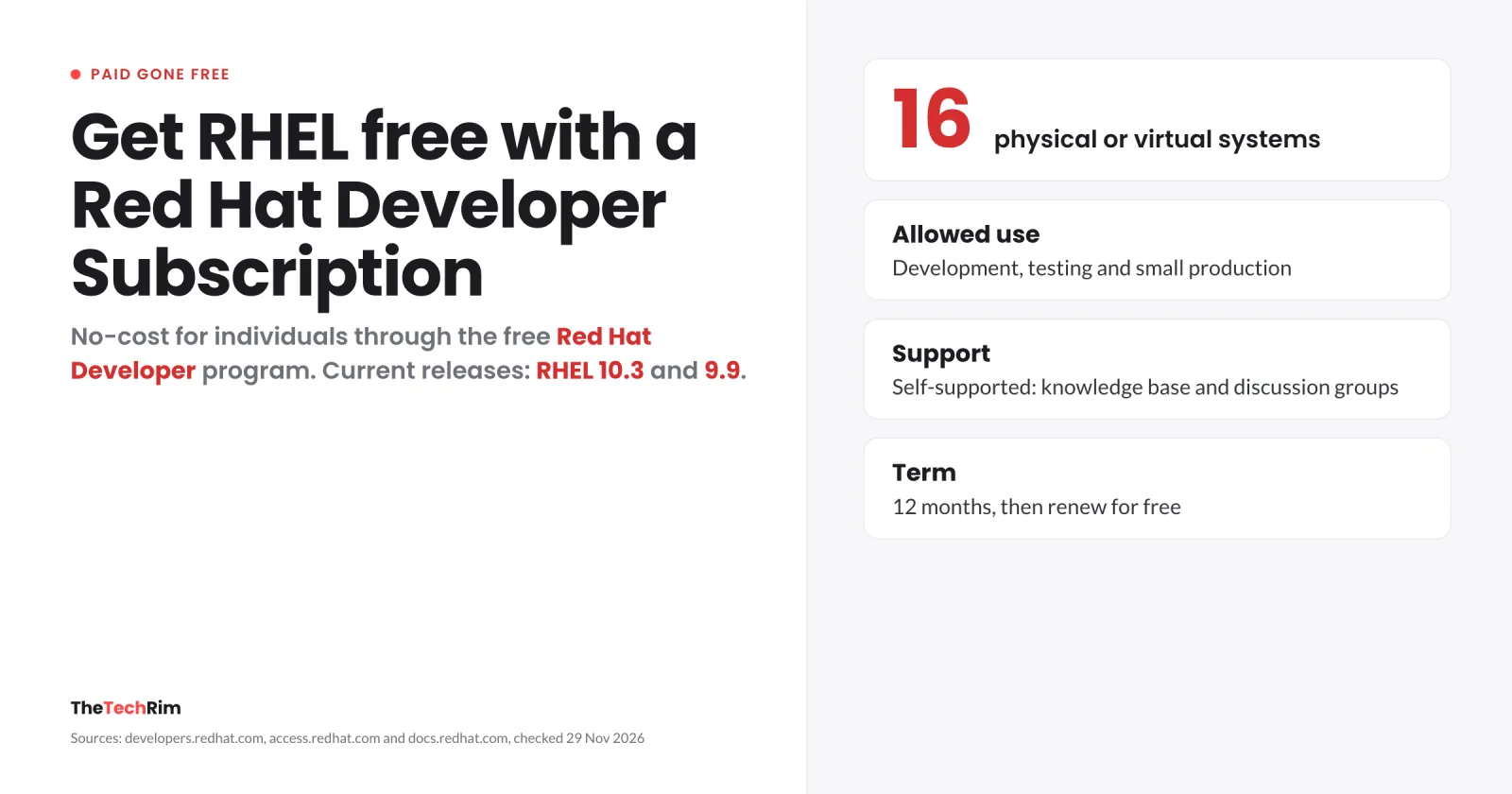
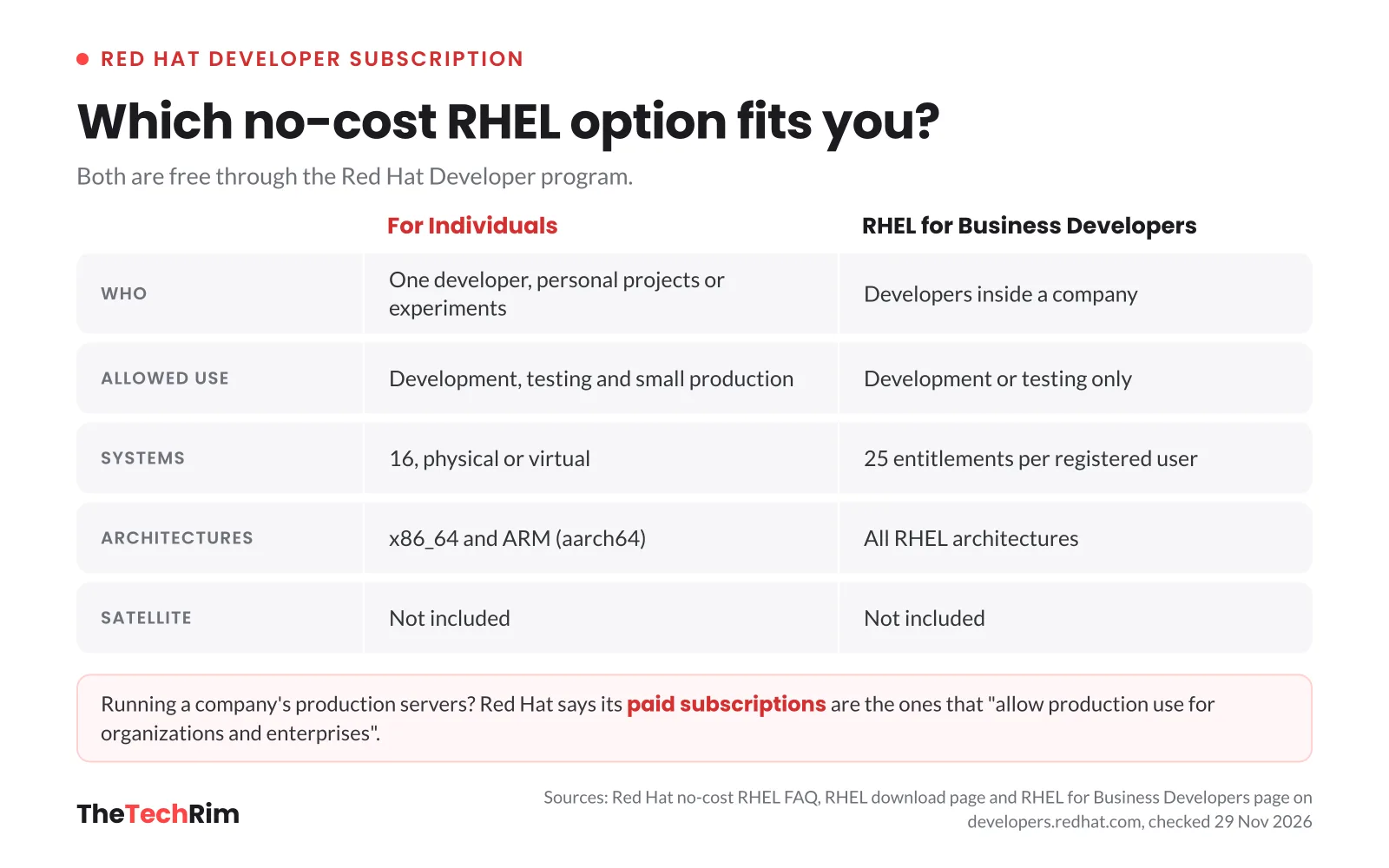
The Red Hat Developer Subscription for Individuals is how you get Red Hat Enterprise Linux (RHEL) free. It comes with the free Red Hat Developer program and covers up to 16 physical or virtual systems for development, testing and small production use, is self-supported, and must be renewed every 12 months. Red Hat widened it to 16 systems and small production use in early 2021, during its move from CentOS Linux to CentOS Stream. Developers inside a company have a separate no-cost option, RHEL for Business Developers, for development and testing only.
Every fact below comes from Red Hat's own pages on redhat.com, developers.redhat.com, access.redhat.com and docs.redhat.com, checked on 29 November 2026, when the current releases were RHEL 10.3 and RHEL 9.9, both released on 10 November 2026.
| No-cost option | Who it is for | Allowed use | Systems | Architectures |
|---|---|---|---|---|
| Developer Subscription for Individuals | One developer, for personal projects or experimentation | Development, testing and small production use | 16, physical or virtual | x86_64 and ARM (aarch64) |
| RHEL for Business Developers | Developers inside a company | Development or testing only | 25 entitlements per registered user | All RHEL architectures |
What you get free, and what you do not
The individual subscription gives you:
- RHEL Server, which includes the graphical desktop, plus Application Streams, Red Hat Developer Toolset and compilers, and other Red Hat products.
- The same binaries companies pay for, with all releases, updates and errata, and access to older versions across a ten-year span.
- Self-service help from the Red Hat Customer Portal knowledge base and discussion groups.
- Red Hat Lightspeed (formerly Red Hat Insights), which points out available patches and vulnerabilities.
It does not give you:
- Support. The subscription does not cover help from Red Hat with operating system issues, and the discussion groups carry no service level agreement.
- Red Hat Satellite, which both no-cost options leave out.
- IBM Power or IBM Z. Those architectures come with the Red Hat Developer Subscription for Teams, which you get through your organisation's Red Hat sales contact.
- A second copy. Only one no-cost subscription can be added to a Red Hat account.
How to download RHEL with a developer subscription
- Open the Download Red Hat Enterprise Linux page on developers.redhat.com.
- Click Register now to join the Red Hat Developer program, or log in if you already have a Red Hat account. Joining is free, and the form shows the subscription's terms and conditions. If you have no Red Hat account, one is created, with the email address you registered as its username.
- Back on the download page, scroll to Release-specific downloads and find Red Hat Enterprise Linux 10.3.
- Choose x86_64 for an Intel or AMD PC, or aarch64 for ARM. Then pick DVD iso (10.91 GB for x86_64), which carries the installer and the software packages, or Boot iso (893.18 MB for x86_64), which only starts the installer and then needs Red Hat's Content Delivery Network or another source for the packages. Click Download.
- Red Hat adds the subscription automatically when you register and download. To check, sign in at access.redhat.com/management: you should see one active Red Hat Developer Subscription for Individuals.
Red Hat says the download needs JavaScript, and that pop-up or tracking blockers and anti-malware software can get in the way. The same page lists RHEL 9.9 and older releases back to RHEL 7.9, plus a RHEL image for Windows Subsystem for Linux (WSL2).
Install RHEL and register the system
RHEL 10 needs a 64-bit Intel or AMD processor at the x86-64-v3 level, or a 64-bit ARM processor (ARMv8.0-A). Red Hat's limits table lists 2 GiB of RAM as the minimum for an x86_64 install from local media (3 GiB for an HTTP(S) or FTP network install) and 10 GB of disk space, with 20 GB recommended. RHEL 9 needs only x86-64-v2, so RHEL 9.9 is the one to pick if your processor falls short of x86-64-v3.
You do not need to repartition your PC to try it. Red Hat's no-cost RHEL FAQ says RHEL can run in a virtual machine on Windows, macOS or Linux, and names VirtualBox, VMware, Microsoft Hyper-V and KVM. Every virtual machine counts toward your 16 systems: on a Windows PC you can run 16 RHEL virtual machines, and a physical RHEL install leaves room for 15 virtual machines on it. If you want VMware, our VMware Workstation Pro free download guide shows where to get it.
To install on a physical PC from Windows, Red Hat's RHEL 10 guide writes the ISO to a USB stick with Fedora Media Writer, a community tool that Red Hat does not support. Choose Custom Image, select the ISO, pick the drive and click Write to disk. It overwrites the stick without a warning. Our Rufus alternative guide compares other bootable USB tools.
In the installer, Server with GUI is the default base environment under Software Selection, so you get a graphical desktop unless you change it. To register during installation, click Connect to Red Hat under Software on the Installation Summary screen and sign in with the Account option.
If you skip that, register from a terminal after the first boot. Registering attaches the system to your subscription so it can download software and updates. Run these commands as root. The first is the one Red Hat's registration article gives; your username is your Red Hat login, which for accounts made on the developer site is usually your email address.
subscription-manager register --username <username> --password <password>Running subscription-manager register on its own prompts for both instead. To confirm the system is registered, Red Hat says to use this command rather than the status command, and notes that an "Overall Status: Disabled" line is not an error:
subscription-manager identityRed Hat has moved accounts to Simple Content Access, so you do not attach a subscription to each system. You register it and enable the repositories you need. The RHEL 10 docs also describe the RHC client, which registers the system and by default turns on Red Hat Lightspeed analytics and remote management. Their example uses an activation key and organization ID instead of your password:
rhc connect --activation-key=<activation_key> --organization=<organization_ID>Common snags: renewal, the 16-system limit and work use
- It expires after one year. Red Hat emails you 30 days before the end date and again on the day it expires. You can renew in the last 30 days or at any time after it lapses: log in at developers.redhat.com/d4i-renewal, tick the terms checkbox and click Submit. A late renewal deletes nothing from your systems, but they get no updates until you renew. Red Hat's renewal guide says Submit renews the subscription immediately, and that with Simple Content Access you need not remove and reattach subscriptions afterwards.
- 16 systems is the maximum. Physical machines, virtual machines and cloud instances all count. Through Red Hat Cloud Access you can run the 16 on a Red Hat certified cloud provider, paying only that provider's usual hosting fees.
- It is for one person. Red Hat says the subscription is available to individuals, "not organizations or teams", and is designed for "personal servers, home labs, and small open source communities". You may use it on a work laptop, but check your company's IT policy first: Red Hat notes that many organisations prohibit software not licensed to them. Red Hat's FAQ says its paid subscriptions "allow production use for organizations and enterprises".
- "Subscription required" errors. If the download says a subscription is required, or registration stops with "No service level will cover all installed products" or "User is not able to register with any orgs", the account has no current subscription. Red Hat's fix is to log in to developers.redhat.com, start the download again (you can cancel it once it begins) and check access.redhat.com/management again.
FAQ
Is RHEL free for personal use?
Yes. The Red Hat Developer Subscription for Individuals and the Red Hat Developer program are both free. It covers up to 16 systems and is renewed once a year.
Can I use the free RHEL subscription in production?
For small production use as an individual, yes. Red Hat's FAQ lists demos, prototyping, QA, small production uses and cloud access as allowed uses of the 16 systems. RHEL for Business Developers is for development and testing only.
What happens if my Red Hat developer subscription expires?
Nothing is removed from your systems. Until you renew, they are not eligible for updates and you lose access to the support documents. You can renew at any time after it lapses.
Does the free subscription include Red Hat support?
No. It is self-supported: you get the Customer Portal knowledge base and discussion groups, but no help from Red Hat with operating system problems. Paid subscriptions add support with agreed response times.
Can I use the developer subscription at work?
As an individual, you can use it on a company-owned device if your employer's IT policy allows it. For developers building software inside a company, Red Hat offers RHEL for Business Developers, which gives up to 25 entitlements for development and testing.